Adobe has quietly changed more than just a version number. With the arrival of Premiere 26, the company has also reshaped the identity of one of the most widely used video editing applications in the world. The removal of “Pro” from the name may seem symbolic, but it reflects a larger shift. Premiere is no longer positioned as a tool only for professionals. It is now framed as a universal creative platform, built for filmmakers, content creators, journalists, and digital storytellers at every level.
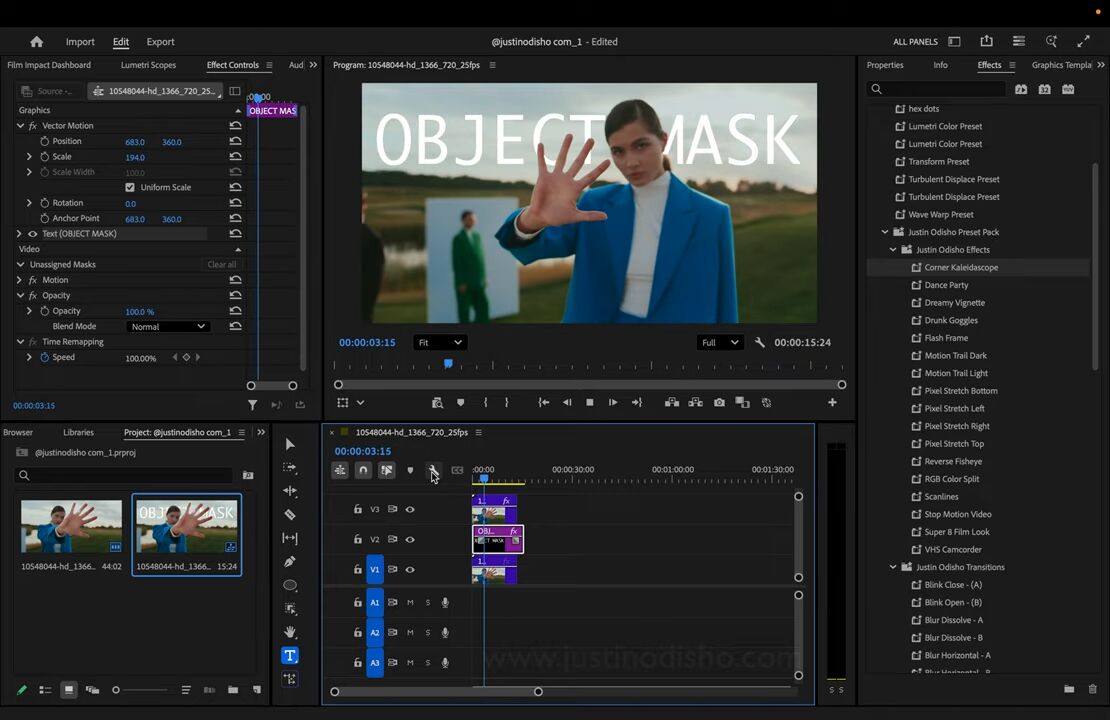
The most important addition in Premiere 26 is the new AI powered Object Mask tool. This feature allows editors to simply hover over a person or object in a clip and click to create a precise tracking mask within seconds. What previously required keyframes, manual adjustments, and patience is now handled almost instantly. The mask follows movement accurately, opening the door for selective color grading, background manipulation, lighting control, and creative effects without technical complexity.
Adobe describes the Object Mask as a way to “mask and track any person or object moving through your clip with ease.” In real-world terms, this means editors can isolate subjects, highlight motion, or apply effects without breaking creative flow. It mirrors the subject selection tools photographers already use in Photoshop and Lightroom, now brought fully into the video world.
Alongside Object Masking, Adobe has completely redesigned its Shape Masks. Ellipse, Rectangle, and Pen masks now operate faster, smoother, and more intuitively. Tracking performance has reportedly improved by up to twenty times compared to previous versions, and live preview tracking finally gives editors real-time visual feedback while adjustments are applied. This change alone removes one of the longest standing frustrations in Premiere workflows.
Both Object Masks and Shape Masks are now accessible directly from the top toolbar, making masking tools visible and approachable instead of hidden behind layers of menus. This signals Adobe’s intention to make advanced editing feel simple rather than technical.
Collaboration also receives a major upgrade in Premiere 26 through deeper integration with Frame.io. The new Frame.io V4 panel is now available directly inside Premiere, allowing editors to review, approve, comment, and manage feedback without leaving the editing environment. While still in beta, this update strengthens Premiere’s role in professional team workflows, where remote collaboration has become the norm rather than the exception.
Adobe has also fully integrated Adobe Stock into Premiere 26. Editors now gain direct access to more than 52 million stock video clips from within the software itself, including nearly 100,000 free assets. This removes the barrier between searching for footage and using it. Content discovery becomes part of the editing process rather than a separate task.
What connects all these changes is speed. Premiere 26 is clearly designed to remove friction. Less clicking. Less manual labor. Less technical hesitation. More time spent shaping stories instead of managing software.
Adobe’s timing is not accidental. As filmmakers gather for the 2026 Sundance Film Festival, Adobe highlighted that the majority of films premiering there were created using Adobe Creative Cloud. Premiere 26 is positioned as proof that Adobe continues to power modern storytelling, from independent creators to large production teams.
The rebranding also reflects a cultural shift in video creation. Editing is no longer reserved for studios and post-production houses. It happens in bedrooms, cafés, newsrooms, classrooms, and mobile workstations. By removing “Pro” from the name, Adobe acknowledges that professionalism today is defined by creativity, not by titles.
Premiere 26 is still the same nonlinear editing platform at its core, but its future direction is clear. It is becoming smarter, faster, and more accessible, using artificial intelligence not as a gimmick but as a way to reduce creative resistance.
For editors who have spent years manually tracking masks, refining shapes, managing collaboration platforms, and searching for assets outside their editing environment, Premiere 26 feels like a quiet but meaningful evolution. It does not reinvent video editing. It simply removes obstacles that no longer make sense.
Adobe Premiere 26 is now available to all Premiere and Creative Cloud subscribers worldwide.